
Meta ‘Describe your audience’ tool explained: How natural-language targeting is changing Facebook ads

What is ‘Describe your audience’?
In 2026, Meta rolled out a new audience-building feature called "Describe Your Audience". Instead of manually selecting interest segments from a list, advertisers can describe their target customer in natural language. Meta's system analyses the description, suggests relevant segments, and lets the advertiser review and keep the ones that fit.
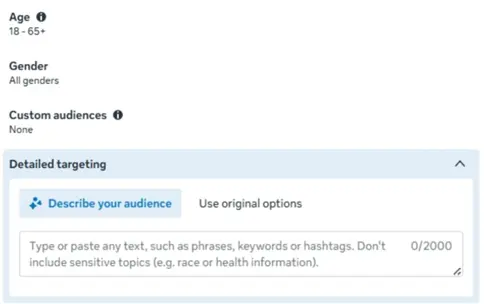
When available, the option appears at the ad set level in the audience targeting section, exactly where interests are normally chosen. The feature is rolling out gradually inside Meta Ads Manager, so not every account has access yet.
Is It Actually Helpful?
The short answer is yes, with caveats. Its value depends on who is using it and what data they already have.
For new advertisers, it lowers the barrier to entry. They can describe customers in business language rather than learning every interest taxonomy and best practice inside Ads Manager.
For experienced advertisers, there are three practical uses:
- It is a testing tool. By creating a separate ad set with Meta's recommended segments, advertisers can evaluate whether the approach lifts performance without disrupting existing campaigns.
- It surfaces segments that manual targeting may have missed. A clear description sometimes prompts Meta to suggest interest clusters the advertiser hadn't considered.
- It acts as a structuring tool. By splitting personas into distinct ad sets, each anchored by a clear description, advertisers can align creative and messaging to each profile rather than running one generic ad to a broad audience.
What the feature cannot do for you
The feature does not automate audience understanding. Used well, it is the output of customer research, not a substitute for it. Advertisers still need to answer the basics: who is the buyer, what problem are they solving, what life stage are they in, what is their income bracket, and how do they make decisions? The clearer the internal picture, the better the tool performs.
Without that grounding, descriptions become vague and so do Meta’s suggestions. A description of “parents interested in parenting” will return broad, unfocused parenting interests. Specific descriptions, built on real customer research, will return tighter recommendations.
The contrast is sharp:
The feature also offers limited additional value for advertisers already running data-driven campaigns. Where first-party data is in play, things like email lists, CRM exports, or lookalike audiences, Meta's algorithm already prioritises observed behaviour over interests. In those campaigns, first-party signal typically outperforms interest-based targeting on its own.
Four rules before you use it
Start with customer clarity.
Build a clear picture of the ideal customer before opening Ads Manager. The sharper the persona, the sharper the description.
Describe with behavioural and contextual detail.
Include life stage, situation, and observable behaviours. "Recently relocated young professionals in tech roles" is far more useful than "young professionals."
Treat suggestions as a starting point.
Meta's recommendations are derived from the description and general knowledge, not from your own conversion data. Review each one before applying.
Test in isolation before scaling.
Run new audiences in separate ad sets first. Compare against existing ad sets. Some will outperform, others won't. Scale only what testing validates.
What this feature signals about the future
The release reflects a broader shift. Meta is moving away from manual targeting controls and toward automated audience matching. Two consequences follow:
Targeting becomes more automated and less controlled.
As Meta's models improve, advertisers no longer need deep fluency in interest mechanics. They describe customer intent and the system finds the match. That lowers the barrier for new advertisers, but it also means less precise control over who sees an ad.
Creative becomes the real performance lever.
When targeting automates, the variables advertisers still control directly, the message, the offer, the creative execution, carry more weight. The ability to decode customer pain points and address them in the creative is becoming the core competitive advantage.
The winning formula is to use both. Lean into automated targeting, then invest disproportionately in creative strategy. When the right people see a message that speaks to their specific situation, ad spend works harder.
Work with an agency that understands both paid media and creative. Speak with us here.

Google's biggest Search ads upgrade in a decade swaps keyword lists for intent signals, rewrites ad copy on the fly, and reroutes clicks to the best landing page. Here's how it works and how to launch it for your brand.

Meta’s most automated campaign type fails quietly when it is given the wrong job. Here is the account structure that allows it to do its best work.

Google Ads has long been written off as “slow” for product testing, but the 2026 evolution of Demand Gen changes that.